
Frequently Asked Questions
- Advice
- Comercial
- Advice

All claims are addressed as soon as they are lodged and within a maximum period of 21 working days.
Below are the deadlines, according to the type of claim:
Payments received - PThese may be resolved as soon as they are lodged or within a maximum period of 7 working days.
Problems with your bill – You will receive an answer within a maximum period of 5 working days.
Incidents with your meter reading – This shall be addressed within a maximum period of 5 working days.
Problems with your contract - You will receive an answer within a maximum period of 15 working days. If the claim is in relation to a product that you have not contracted, you will receive a reply within a maximum period of 21 working days.
Incidents with the service received for a contracted product – This shall be addressed within a maximum period of 21 working days.
Supply interruption through lack of payment - You will have a solution within a maximum period of 3 working days.
Lack of gas supply – You will receive a reply within a maximum period of de 21 working days.
Customer service received was not correct – This will be addressed within a maximum period of 5 working days.
Problems with your online processes – You will receive an answer within a maximum period of 15 working days.
Personal data protection problems (LOPD) – This will be addressed within a maximum period of de 7 working days.
You can update your contact data:
You can update your bank account from My Endesa / My Contracts.
Click on the button Modify Contract, choose the option Change My Billing, Contract and Bank Account Information, and select the contract that you wish to modify. When you edit the bank account modification, we´ll show you a list of all of your accounts. If you wish to modify one of the accounts, select it, make the changes necessary, and don't forget to save at the end.
In the case that in modifying your bank account it is necessary for you to provide the SEPA Law mandate, we´ll give you a link to download it. You must fill it out, sign it, and send it to us using any one of the channels that we make available to you:
From My Endesa / My Contracts click on the Modify Contract button, choose the Modify My Contracted Capacity and Rate option, and select the electricity contract(*) for which you wish to change the contracted capacity or rate (with or without rate restriction).
Before you change your capacity, we recommend that you use our capacity calculator, which allows you to simulate the capacity best adapted to your needs.
When changing capacity, you should also bear in mind:
(*) In the case of the Canary Islands, the CIE must also be attached for installations less than 20 years old.
(*) In the case of the Canary Islands, the CIE must also be attached for installations less than 20 years old.
From My Endesa / My Contracts, click the Modify Contract button, select the option Make Changes to My Contracted Products and Services, and choose the contract you wish to change.
Remember that changing the product contracted may change contracting conditions.
Yes, from My Endesa / My Bills you can view the list, with all of your bills ordered by issuance date. In the list of bills you can see:
We also give you the option of downloading the bill.
In addition, you can pay your bills online. Select the bill that is pending payment directly from the list of bills, or using the search engine by entering the bill number.
Once you've found the bill, click on the Pay Now button. Select the payment method you want to use:
You can enter your meter reading at My Endesa) / My Contracts, by selecting the contract for which you wish to enter the reading and clicking on the Enter Reading link.
You can also enter your reading without having to register at the endesaclientes.com homepage through Solve in Just One Minute / Enter Your Reading.
Before entering your reading, you should know:
You must indicate the reading date and information. If you are signed up for a rate with Restriction Rate, you must provide us with the different readings that appear on your meter.
If you want to carry out a new transaction you can do it from My Endesa / New Transactions, by selecting the type of transaction that you need to carry out - consultation, transaction or claim - and telling us the category, the subject and the reason.
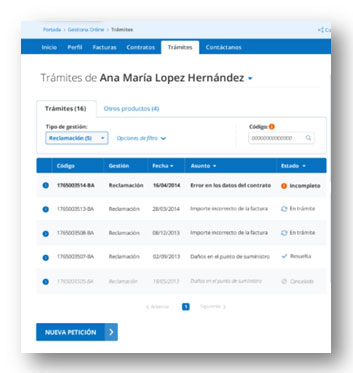
You can monitor your transactions from My Endesa / My Transactions.
We also provide you with the My Endesa chat service, where our expert agents will be happy to assist you with your transactions.
From My Endesa / My Contracts, click the Modify Contract button, select the option Cancel My Contract, and choose the contract you wish to cancel.
For security reasons, we will always confirm your cancellation.
It is not possible to cancel this contract: